
Self-host Paperless-ngx
Turn your paper into a searchable archive, behind your exe.dev login.
Shelley handles the setup. About 20 minutes.
Prefer a terminal?
curl -fsSL https://exe-staging.dev/deploy/paperless-ngx/prompt.txt | ssh exe.dev new --prompt=/dev/stdinPaperless-ngx turns paper into a searchable archive. Scan a letter or snap a receipt, and Paperless OCRs it, files it, guesses its date, correspondent and tags, and keeps the original next to a searchable PDF/A copy. Then "water heater" or "2025 tax" finds it in a second.
On an exe.dev VM it gets a persistent disk and HTTPS with no setup, and it stays behind your exe.dev login: Paperless trusts the email the proxy vouches for, so you're signed in as its admin without another password, and nobody you haven't shared the VM with can reach it at all. Shelley sets it up, checks OCR end to end with a test scan, and schedules a nightly export of everything.
What you get#
- Paperless-ngx with PostgreSQL and Valkey, pinned versions, restarting after a reboot.
- Single sign-on through exe.dev login; you're the Paperless admin, with no password to type.
- A test scan OCR'd and found by search, so you know the pipeline works.
- A consume folder you can drop files into over SSH.
- A nightly export of every document and its metadata, with a tested restore.
What's running, and where
https://my-paperless.exe.xyz/
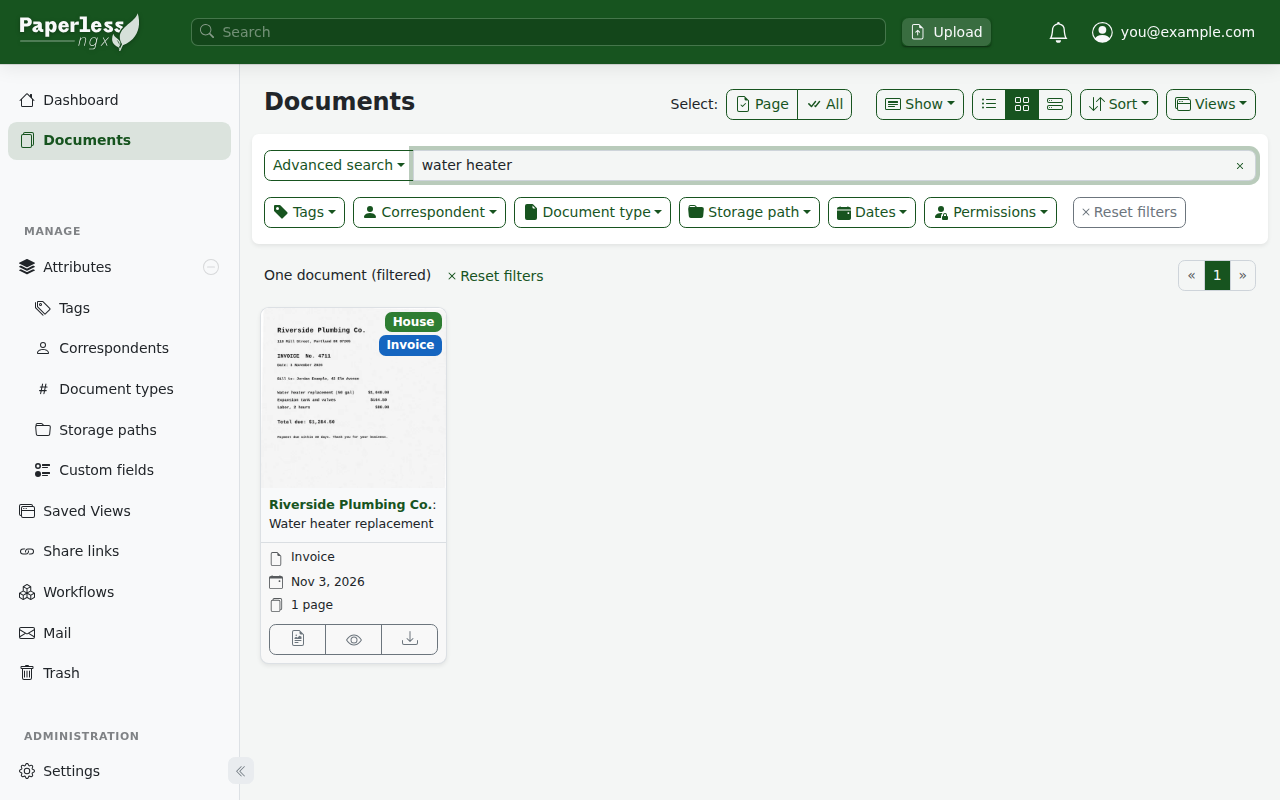
Paperless, signed in as you through your exe.dev login
Deploy with Shelley#
Click Deploy and Shelley will set up Paperless-ngx on a new VM, then check that it works. No config-file wrangling required.
Prefer a terminal?
curl -fsSL \
  https://exe-staging.dev/deploy/paperless-ngx/prompt.txt \
  | ssh exe.dev new --prompt=/dev/stdin
What Shelley is told
Set up Paperless-ngx on this VM by following the exe.dev recipe at https://exe-staging.dev/deploy/paperless-ngx.md?via=deploy from top to bottom.

The recipe's example VM name is my-paperless. This VM's name is the output of `hostname`: use it wherever the recipe writes my-paperless. Skip the step that creates the VM; you are on it.

You are done when all of these are true. Check each one yourself:
- Paperless-ngx with PostgreSQL and Valkey, pinned versions, restarting after a reboot.
- Single sign-on through exe.dev login; you're the Paperless admin, with no password to type.
- A test scan OCR'd and found by search, so you know the pipeline works.
- A consume folder you can drop files into over SSH.
- A nightly export of every document and its metadata, with a tested restore.

Read the whole recipe, including the closed details. For initial setup,
follow "Install by hand" first, skipping VM creation and SSH: Docker, the
settings, the Compose stack, the test scan, and the nightly export. The
walkthrough at the top is for the owner afterwards.
Work as exedev in ~/paperless. Never overwrite an existing paperless.env,
postgres.env or admin-password. Don't set up email, phone apps, AI, Tika,
or extra OCR languages unless the owner asks; don't make the VM public or
share it. Don't run Restore or Update.
Verify docker.service is enabled, every container uses unless-stopped,
the webserver is healthy, the log says it created the superuser, the test
scan was consumed and a search for "water heater" finds it, and the export
timer is enabled and its test run wrote manifest.json. Do not reboot.
Never paste the admin password into the chat; say it's in
~/paperless/admin-password. Finish by pointing the owner to "Open
Paperless" and "Get your paper in".

Finish with the URLs I should open.
Also at /deploy/paperless-ngx/prompt.txt. The recipe it follows is /deploy/paperless-ngx.md.
Open Paperless#
Open https://my-paperless.exe.xyz/ and sign in to exe.dev if asked.
You land on Paperless's dashboard, signed in as your exe.dev email, which
is Paperless's admin account. There's already one document: the test scan
Shelley made, a plumbing invoice. Search for water heater to see OCR at
work, then delete it if you like.
The admin account also has a password, for the phone apps and for the day you sign in without exe.dev. On your computer:
ssh my-paperless.exe.xyz cat paperless/admin-password
Keep it in your password manager. Changing it in Paperless (My Profile) is fine; the file just goes stale.
Get your paper in#
Paperless takes PDFs, images (JPEG, PNG, TIFF, WebP) and plain text out
of the box; Office files and .eml mail need
Tika and Gotenberg. Each
file becomes a document once OCR finishes, usually within half a minute;
File Tasks in the sidebar shows progress and failures.
From a browser. Drag files onto any page, or click Upload in the top bar. Your phone's browser works too: scan with its document scanner (iOS Files, Google Drive), sign in to exe.dev once, and upload the PDF.
Into the consume folder. Anything copied into ~/paperless/consume
is picked up within seconds and removed once it's in. On your computer:
scp ~/Scans/*.pdf my-paperless.exe.xyz:paperless/consume/
A scanner or sync tool that writes over SFTP can drop files there too.
Subfolders are ignored unless you add PAPERLESS_CONSUMER_RECURSIVE=true
to paperless.env.
By email to the VM. Every exe.dev VM can receive mail at
anything@my-paperless.exe.xyz. A small script hands the attachments of
mail from addresses you choose to Paperless; see
Email scans to the VM.
From a mailbox you already have. Paperless can read an IMAP account (a dedicated Gmail or Fastmail address, say) and file attachments by rules. Set it up in Settings → Mail: add the account, then a rule for which folder and which attachments. Gmail and Outlook need an app password, or OAuth client IDs you register yourself; see Incoming email.
From a phone app. See Phone apps.
Find things again#
Search looks inside every document's OCR text, title and tags. Paperless also learns from you: assign a correspondent, type and tags to a few documents, and it starts suggesting them for new ones (it retrains every hour). For rules you'd rather spell out ("anything from Riverside Plumbing gets tag House"), use Workflows. Saved views put "Unpaid invoices" or "Tax 2026" on the dashboard.
Originals are kept untouched in ~/paperless/media/documents/originals;
the OCR'd PDF/A copies are in .../archive. You never need to touch
them, but they're plain files if you want them.
Phone apps#
Two community apps work with Paperless: Swift Paperless on iOS and Paperless Mobile on Android (Play Store and F-Droid). The VM is private, so an app needs two things: a VM token to pass exe.dev's proxy, and your Paperless user name and password to sign in to Paperless itself.
Make a token that opens this VM's site and nothing else; on your computer:
ssh exe.dev ssh-key generate-api-key --vm=my-paperless --label=paperless-phone --exp=90d
On the app's login screen, add a custom header (Swift Paperless:
Extra headers; Paperless Mobile: Additional Headers) named
X-Exedev-Authorization with the value Bearer and the token. Then
enter https://my-paperless.exe.xyz, your exe.dev email as the user
name, and the password from ~/paperless/admin-password.
We checked this exact pair of headers with curl against Paperless's API
(listing, search and upload all work), but not inside the apps; if an app
can't send a custom header, it can't reach a private VM. The token lasts
90 days; ssh exe.dev ssh-key remove paperless-phone revokes it sooner.
Share it with your household#
Share the VM with someone's email; on your computer:
ssh exe.dev share add my-paperless partner@example.com
When they open the site, Paperless creates a user named after their email, with no permissions: they see an empty Paperless until you give them some. In Settings → Users & Groups, add a group such as "Household" with the view, add and change permissions you want, and put them in it. Documents belong to whoever added them; set Permissions on a document, or a default in a workflow, to share it.
Warning
Paperless believes the
X-ExeDev-Emailheader on every browser request. exe.dev's proxy sets it for signed-in visitors and strips any copy a visitor sends, so throughhttps://my-paperless.exe.xyzit can't be faked. But anything that reaches port 8000 without the proxy, such as another program on the VM, could send it and be you. Don't publish port 8000 another way (Tailscale, a tunnel, a second container network), and keep this VM for Paperless.
OCR languages#
Paperless OCRs in English unless told otherwise. The image already has
German (deu), French (fra), Italian (ita) and Spanish (spa); join
them with + for mixed documents. On the VM:
cd ~/paperless
sed -i 's/^PAPERLESS_OCR_LANGUAGE=.*/PAPERLESS_OCR_LANGUAGE=deu+eng/' paperless.env
docker compose up -d
For any other language, also list its Tesseract package name in
PAPERLESS_OCR_LANGUAGES, which installs it each time the container
starts; for Dutch and Traditional Chinese:
echo 'PAPERLESS_OCR_LANGUAGES=nld chi-tra' >> paperless.env
sed -i 's/^PAPERLESS_OCR_LANGUAGE=.*/PAPERLESS_OCR_LANGUAGE=nld+chi_tra+eng/' paperless.env
docker compose up -d
The package names use -, the OCR codes _. New settings apply to new
documents; to redo old ones, select them and use Reprocess.
Room to grow#
A page of scan is roughly 100 to 500 KB, and Paperless keeps the original
and an OCR'd copy, so 10,000 pages is a few gigabytes. The software takes
about 9 GB (images, database and search index) of a new VM's 25 GB. Check
on the VM with df -h /, and grow the disk when you need to; on your
computer, then on the VM:
ssh exe.dev resize my-paperless --disk=100GB
sudo resize2fs "$(findmnt -no SOURCE /)"
Plans include disk with every 2 vCPUs; past that it's billed per pricing. Memory is rarely the limit: a big batch of OCR uses a couple of CPU cores for a while, and then it's idle.
Keep your documents safe#
Every night at 03:30 (UTC), a timer runs Paperless's document exporter
into ~/paperless/export: every original, its OCR'd copy, and a
manifest.json with all tags, correspondents, users and settings. It
only writes what changed, and deletes files of documents you deleted.
That's a full, portable backup, readable without Paperless, but it lives
on the same disk. Copy it off; on your computer:
rsync -a my-paperless.exe.xyz:paperless/export/ ~/paperless-backup/
For whole-disk copies to your own S3 bucket, use VM backups. Restore brings an export back on a new VM.
Email scans to the VM (optional)#
exe.dev delivers mail sent to anything@my-paperless.exe.xyz into
~/Maildir/new on the VM. mail-to-consume.py
takes each message from an address you list, copies its PDF and image
attachments into the consume folder, and files every message away so
the mailbox never fills up. A systemd path unit runs it whenever mail
arrives.
On your computer, turn on mail for the VM:
ssh exe.dev share receive-email my-paperless on
On the VM, install the script and the units, and list who may send. Replace the address with yours (one per line; add your scanner's or a household member's):
cd ~/paperless
curl -fsSo mail-to-consume.py https://exe-staging.dev/deploy/paperless-ngx/mail-to-consume.py
chmod 755 mail-to-consume.py
echo 'you@example.com' > mail-senders
mkdir -p ~/Maildir/new ~/Maildir/cur
sudo tee /etc/systemd/system/paperless-mail.service >/dev/null <<EOF
[Unit]
Description=Move mailed scans into the Paperless-ngx consume folder

[Service]
Type=oneshot
User=$USER
ExecStart=$HOME/paperless/mail-to-consume.py
EOF
sudo tee /etc/systemd/system/paperless-mail.path >/dev/null <<EOF
[Unit]
Description=Watch ~/Maildir/new for mailed scans

[Path]
DirectoryNotEmpty=$HOME/Maildir/new

[Install]
WantedBy=multi-user.target
EOF
sudo systemctl daemon-reload
sudo systemctl enable --now paperless-mail.path
Now mail a PDF to scans@my-paperless.exe.xyz from a listed address.
journalctl -u paperless-mail.service shows what the script did with
each message.
exe.dev limits a message to 1 MB, attachments included, and
attachments grow by a third in transit: keep scans under about 700 KB
(a few pages in black and white), or use the upload page for bigger
ones. The sender check reads the From: line; exe.dev rejects some
forged mail but runs no spam checks, so don't share the address widely.
At worst, someone could add documents.
AI suggestions and chat (optional)#
Paperless 3 can ask an LLM for a document's title, tags, correspondent and date, and answer questions about one document or all of them ("How much do I owe the plumber?"). exe.dev's LLM gateway needs no API key on the VM.
Warning
This sends your documents' text to the model provider, through exe.dev's gateway, and uses your exe.dev LLM allocation. Leave it off for documents you wouldn't paste into a chatbot.
On the VM:
cd ~/paperless
cat >> paperless.env <<'EOF'
PAPERLESS_AI_ENABLED=true
PAPERLESS_AI_LLM_BACKEND=openai-like
PAPERLESS_AI_LLM_ENDPOINT=https://llm.int.exe.xyz/v1
PAPERLESS_AI_LLM_MODEL=gpt-5.4-mini
PAPERLESS_AI_LLM_EMBEDDING_BACKEND=openai-like
PAPERLESS_AI_LLM_EMBEDDING_MODEL=text-embedding-3-small
EOF
docker compose up -d
Once the webserver is back (about a minute), build the index chat searches in, once; after that, Paperless updates it nightly:
docker compose exec -T webserver document_llmindex rebuild
An AI button then appears on each document's suggestions, and a chat
box in the top bar. On our test VM, suggestions for the plumbing invoice
took about 9 seconds, and a question about it was answered in under two.
To turn it off, set PAPERLESS_AI_ENABLED=false and run docker compose up -d.
Office files: Tika and Gotenberg (optional)#
To take Word, Excel, PowerPoint, LibreOffice files and .eml emails,
Paperless needs Apache Tika to read them and Gotenberg to turn them into
PDFs. They add about 3 GB of disk and 300 MB of memory. On the VM,
add the two services and three settings to compose.yaml:
cd ~/paperless
python3 - <<'EOF'
from pathlib import Path
p = Path("compose.yaml")
s = p.read_text()
assert "tika" not in s, "already added"
s = s.replace("      PAPERLESS_DBHOST: db\n", """      PAPERLESS_DBHOST: db
      PAPERLESS_TIKA_ENABLED: 1
      PAPERLESS_TIKA_GOTENBERG_ENDPOINT: http://gotenberg:3000
      PAPERLESS_TIKA_ENDPOINT: http://tika:9998
""", 1)
s += """  gotenberg:
    image: docker.io/gotenberg/gotenberg:8.38
    restart: unless-stopped
    command:
      - "gotenberg"
      - "--chromium-disable-javascript=true"
      - "--chromium-allow-list=^file:///tmp/.*"
  tika:
    image: docker.io/apache/tika:3.3.1.0
    restart: unless-stopped
"""
p.write_text(s)
EOF
docker compose up -d
These are the versions and Gotenberg flags from Paperless's own
docker-compose.postgres-tika.yml.
Open it to the internet#
To reach Paperless without exe.dev login (say, for an app that can't send a custom header), make the VM public; on your computer:
ssh exe.dev share set-public my-paperless
The proxy then sends no X-ExeDev-Email, so everyone gets Paperless's
own login page, and you sign in with your email and the admin password.
Turn on two-factor login in My Profile first, and give every other
user a strong password. ssh exe.dev share set-private my-paperless
closes it again.
The nuts and bolts#
Happy clicking Deploy? You can stop here. These are the same setup steps Shelley follows, plus the maintenance commands for later. Tested with Paperless-ngx 3.5.1, PostgreSQL 18 and Valkey 9.
Install by hand
Create a VM#
On your computer (pick another name if my-paperless is taken):
ssh exe.dev new --name=my-paperless
ssh my-paperless.exe.xyz
All remaining installation commands run on the VM, as exedev. They
use hostname, so your VM can have any name.
Get Docker ready#
Enable Docker at boot, or exe.dev's on-demand Docker won't restart Paperless after a reboot:
sudo systemctl enable --now docker.service
systemctl is-enabled docker.service
Expect enabled.
Make the settings#
This picks random passwords for the database and the Paperless admin, and a secret key, and makes your exe.dev email (from the VM's reflection service) the admin's user name, so exe.dev login signs you in as the admin. The files are readable only by you. It won't overwrite existing ones.
mkdir -p ~/paperless/consume ~/paperless/export && cd ~/paperless
if [ ! -f paperless.env ]; then
  (
    umask 077
    OWNER=$(curl -fsS https://reflection.int.exe.xyz/email | jq -r .email)
    DBPASS=$(openssl rand -hex 24)
    openssl rand -base64 24 > admin-password
    echo "POSTGRES_PASSWORD=$DBPASS" > postgres.env
    cat > paperless.env <<EOF
PAPERLESS_URL=https://$(hostname).exe.xyz
PAPERLESS_SECRET_KEY=$(openssl rand -hex 32)
PAPERLESS_DBPASS=$DBPASS
PAPERLESS_TIME_ZONE=UTC
PAPERLESS_OCR_LANGUAGE=eng
PAPERLESS_ADMIN_USER=$OWNER
PAPERLESS_ADMIN_MAIL=$OWNER
PAPERLESS_ADMIN_PASSWORD=$(cat admin-password)
EOF
  )
fi
ls -l admin-password paperless.env postgres.env
grep -E '^PAPERLESS_(URL|ADMIN_USER)=' paperless.env
Expect three files with -rw-------, your VM's exe.xyz address with no
trailing slash, and your email. PAPERLESS_URL is what Paperless checks
form posts and host names against; if it's wrong, logins fail with a
CSRF error. Set PAPERLESS_TIME_ZONE to yours (such as
Europe/Berlin) if you like; it decides which day a document's date
falls on.
Start Paperless#
The image tags are pinned; Update moves them. Paperless
reads your identity from the X-ExeDev-Email header that exe.dev's
proxy adds, for the web app only (the API still wants a password or
token). USERMAP_UID makes the files in media, data and consume
yours.
cat > ~/paperless/compose.yaml <<'EOF'
# Paperless-ngx behind exe.dev's HTTPS proxy, after Paperless's
# docker-compose.postgres.yml.
services:
  broker:
    image: docker.io/valkey/valkey:9-alpine
    restart: unless-stopped
    volumes:
      - ./redis:/data
  db:
    image: docker.io/library/postgres:18
    restart: unless-stopped
    env_file: postgres.env
    environment:
      POSTGRES_DB: paperless
      POSTGRES_USER: paperless
    volumes:
      - ./pgdata:/var/lib/postgresql
  webserver:
    image: ghcr.io/paperless-ngx/paperless-ngx:3.5.1
    restart: unless-stopped
    depends_on:
      - db
      - broker
    ports:
      - "8000:8000"
    env_file: paperless.env
    environment:
      PAPERLESS_REDIS: redis://broker:6379
      PAPERLESS_DBENGINE: postgresql
      PAPERLESS_DBHOST: db
      USERMAP_UID: 1000
      USERMAP_GID: 1000
      # Sign in whoever exe.dev's proxy says is visiting (web app only).
      PAPERLESS_ENABLE_HTTP_REMOTE_USER: "true"
      PAPERLESS_HTTP_REMOTE_USER_HEADER_NAME: HTTP_X_EXEDEV_EMAIL
    volumes:
      - ./data:/usr/src/paperless/data
      - ./media:/usr/src/paperless/media
      - ./export:/usr/src/paperless/export
      - ./consume:/usr/src/paperless/consume
EOF
cd ~/paperless
docker compose up -d
until [ "$(docker inspect -f '{{.State.Health.Status}}' "$(docker compose ps -q webserver)")" = healthy ]; do sleep 5; done
docker compose logs webserver | grep -E 'Created superuser|Paperless-ngx v'
The first start pulls about 4.5 GB of images and takes a few minutes;
after that, about a minute. Expect Created superuser "you@example.com" with provided password. Paperless creates the admin from
PAPERLESS_ADMIN_* only if the user doesn't exist, so later starts
leave it alone.
Test OCR with a scan#
make-test-scan.py draws a crooked, speckled one-page invoice and saves it as a PDF with no text in it, so Paperless has to OCR it. This makes one inside the Paperless container, drops it in the consume folder, waits for it, and searches for words that are only in the picture:
cd ~/paperless
curl -fsS https://exe-staging.dev/deploy/paperless-ngx/make-test-scan.py |
  docker compose exec -T webserver python3 - > test-scan.pdf
mv test-scan.pdf consume/
AUTH="$(grep -oP '^PAPERLESS_ADMIN_USER=\K.*' paperless.env):$(cat admin-password)"
until [ "$(curl -fsS -u "$AUTH" localhost:8000/api/documents/ | jq .count)" -ge 1 ]; do sleep 5; done
curl -fsS -u "$AUTH" 'localhost:8000/api/documents/?query=%22water%20heater%22' |
  jq -r '.results[] | "\(.title), dated \(.created)"'
ls consume
Expect test-scan, dated 2026-11-03 (the date OCR read off the
invoice) and an empty consume folder, within about a minute.
Set up the nightly export#
A systemd timer runs the exporter inside the container every night. It
updates the export in place, writing only what changed; --delete
removes files of deleted documents, so keep nothing else in export.
sudo tee /etc/systemd/system/paperless-export.service >/dev/null <<EOF
[Unit]
Description=Export Paperless-ngx documents and metadata

[Service]
Type=oneshot
User=$USER
WorkingDirectory=$HOME/paperless
ExecStart=/usr/bin/docker compose exec -T webserver document_exporter ../export --delete --no-progress-bar
EOF
sudo tee /etc/systemd/system/paperless-export.timer >/dev/null <<'EOF'
[Unit]
Description=Nightly Paperless-ngx export

[Timer]
OnCalendar=*-*-* 03:30:00
Persistent=true

[Install]
WantedBy=timers.target
EOF
sudo systemctl daemon-reload
sudo systemctl enable --now paperless-export.timer
sudo systemctl start paperless-export.service
ls ~/paperless/export
systemctl list-timers paperless-export.timer --no-pager
Expect manifest.json and the test scan's files in the listing, and the
timer's next run tonight.
Installation done. Continue with Open Paperless.
Back up and restore
On the VM, sudo systemctl start paperless-export.service refreshes the
export now. Copy it off the VM as in
Keep your documents safe.
Restore#
Paperless's importer only loads into an empty Paperless, so restore
onto a new VM (or move the old data, media, pgdata and redis
aside first). Follow Get Docker ready and
Make the settings. Then, before the first start,
remove the admin settings: the export brings your users back, and an
admin created at startup would collide with them. Don't open the site in
a browser until the import is done, for the same reason.
cd ~/paperless
sed -i '/^PAPERLESS_ADMIN_/d' paperless.env
On your computer, copy the export into the new VM's export folder:
rsync -a ~/paperless-backup/ my-paperless.exe.xyz:paperless/export/
On the VM, follow Start Paperless (the
Created superuser line won't appear), then import:
cd ~/paperless
docker compose exec -T webserver document_importer ../export
It ends with Updating search index... and a progress bar. Your
documents, tags, users and settings are back, and so is the admin's old
password; the new admin-password file doesn't apply, so delete it.
Then set up the nightly export again.
The importer also takes a .zip made with document_exporter ../export --zip.
Update Paperless
Read the release notes
for the new version, then, on the VM, export, move the pinned tag, and
restart. Replace 3.5.2 with the version you want:
cd ~/paperless
sudo systemctl start paperless-export.service
sed -i 's|paperless-ngx/paperless-ngx:.*|paperless-ngx/paperless-ngx:3.5.2|' compose.yaml
docker compose pull
docker compose up -d
until [ "$(docker inspect -f '{{.State.Health.Status}}' "$(docker compose ps -q webserver)")" = healthy ]; do sleep 5; done
docker compose logs webserver | grep 'Paperless-ngx v' | tail -n 1
docker image prune -f
Paperless migrates its database on start. Don't change the major
version of PostgreSQL (postgres:18) the same way: a new major version
can't read the old data directory. Export, then
restore into a fresh install instead.
Something not working?
On the VM:
cd ~/paperless
docker compose ps
docker compose logs --tail=100 webserver
CSRF verification failedorBad Request (400):PAPERLESS_URLinpaperless.envmust be exactlyhttps://<vm>.exe.xyz, no trailing slash. Fix it, thendocker compose up -d.- A file sits in the consume folder: check File Tasks, and the
log for
consumption failed. Unsupported types (Office files without Tika) stay put. Not consuming ...: It is a duplicate: you turned onPAPERLESS_CONSUMER_DELETE_DUPLICATES. Paperless 3 keeps duplicates by default and only warns.- Someone you shared the VM with sees nothing: new users get no permissions. Add them to a group in Settings → Users & Groups.
- A phone app or script gets
401and an exe.dev message: that's exe.dev's proxy: send the VM token inX-Exedev-Authorization. A401withInvalid tokenorAuthentication credentials were not providedcomes from Paperless: check the user name and password. - Mailed scans don't arrive: run
journalctl -u paperless-mail.service.not in mail-sendersmeans theFrom:address isn't listed; nothing at all means the message didn't arrive (over 1 MB, or rejected). - The webserver restarts with
PAPERLESS_SECRET_KEYorPAPERLESS_DBENGINEerrors: Paperless 3 needs both; they're inpaperless.envandcompose.yamlabove. - Down after a reboot: run
sudo systemctl enable --now docker.service.
Frequently asked questions#
Why not put Paperless on the public internet?
Your archive holds bank statements, tax returns and IDs. Behind exe.dev login, nobody gets to Paperless's login page, let alone your documents, without being someone you shared the VM with. You can make it public later and use Paperless's own passwords and two-factor login instead, but start private.
How do my scans get in?
Drag files into the web page from any browser, including your phone's. Or copy them into the consume folder over SSH, email them to the VM, have Paperless read an IMAP mailbox, or use a phone app with a VM token. See Get your paper in.
Does it read languages other than English?
Yes. The image ships Tesseract data for English, German, French, Italian and Spanish, and can install any other Tesseract language when it starts. See OCR languages.
Does it have AI?
Paperless 3 can suggest titles, tags and correspondents with an LLM, and answer questions about your documents. It works with exe.dev's LLM gateway with no API key, but it sends document text to the model: it's off unless you turn it on.
How big a VM do I need?
A new exe.dev VM (2 vCPUs, 8 GB) is plenty for a household: Paperless idles at about 1.2 GB of memory, and OCR of a page takes a few seconds. Disk is what grows. See Room to grow.
How much does it cost?
Paperless-ngx is free and open source (GPL-3.0). You pay for your exe.dev plan, plus extra disk if your archive outgrows it, and LLM use if you turn AI on.
Published Nov 21, 2026 · Updated Nov 21, 2026 · tested end to end Nov 21, 2026 · Markdown · manifest.json · Something wrong? Tell us